0. 차세대 AI 네이티브 조직의 시각적 혁신
인공지능 에이전트가 도입되면서 전통적인 피라미드형 조직도는 빠르게 해체되고 있습니다. 현대의 빅테크 기업과 스마트 조직은 한 명의 리더(CEO) 아래 소수의 ‘특화된 AI 에이전트’가 수백, 수천 개의 하위 태스크를 자율적으로 분기 실행하는 ‘네트워크 파이프라인 구조’로 진화하고 있습니다.
graph TD
    A[Level 1: CEO / 전략적 사고 & 방향 설정] -->|전략 전달 파이프라인| B[Level 2: 4대 핵심 AI 에이전트 레이어]
    B -->|나무뿌리형 데이터 분기 Fan-out| C[Level 3: 수십 개의 마이크로 실행 노드]
    style A fill:#FFD700,stroke:#333,stroke-width:2px;
    style B fill:#00C7B1,stroke:#333,stroke-width:2px;
style C fill:#E0F7FA,stroke:#00C7B1,stroke-width:1px;- 회로 기판과 데이터 플로우 메타포: 단순한 선 대신 디지털 회로(Circuit board)와 고속 데이터 버스(Data bus) 형태의 커넥터를 적용하여 ’정보 손실 없는 100% 전략 전달’을 시각화합니다.
- 엄격한 컬러 코딩(Color Coding): 순백색 배경 위에서 메인 테마인 청록색(Teal: #00C7B1)과 전략 포인트를 나타내는 골드 옐로우(Yellow: #FFD700) 단 두 가지 액센트 컬러만을 사용하여 극도의 전문성을 확보합니다.
1. 레퍼런스 비주얼 정밀 분석 (Deconstruction)
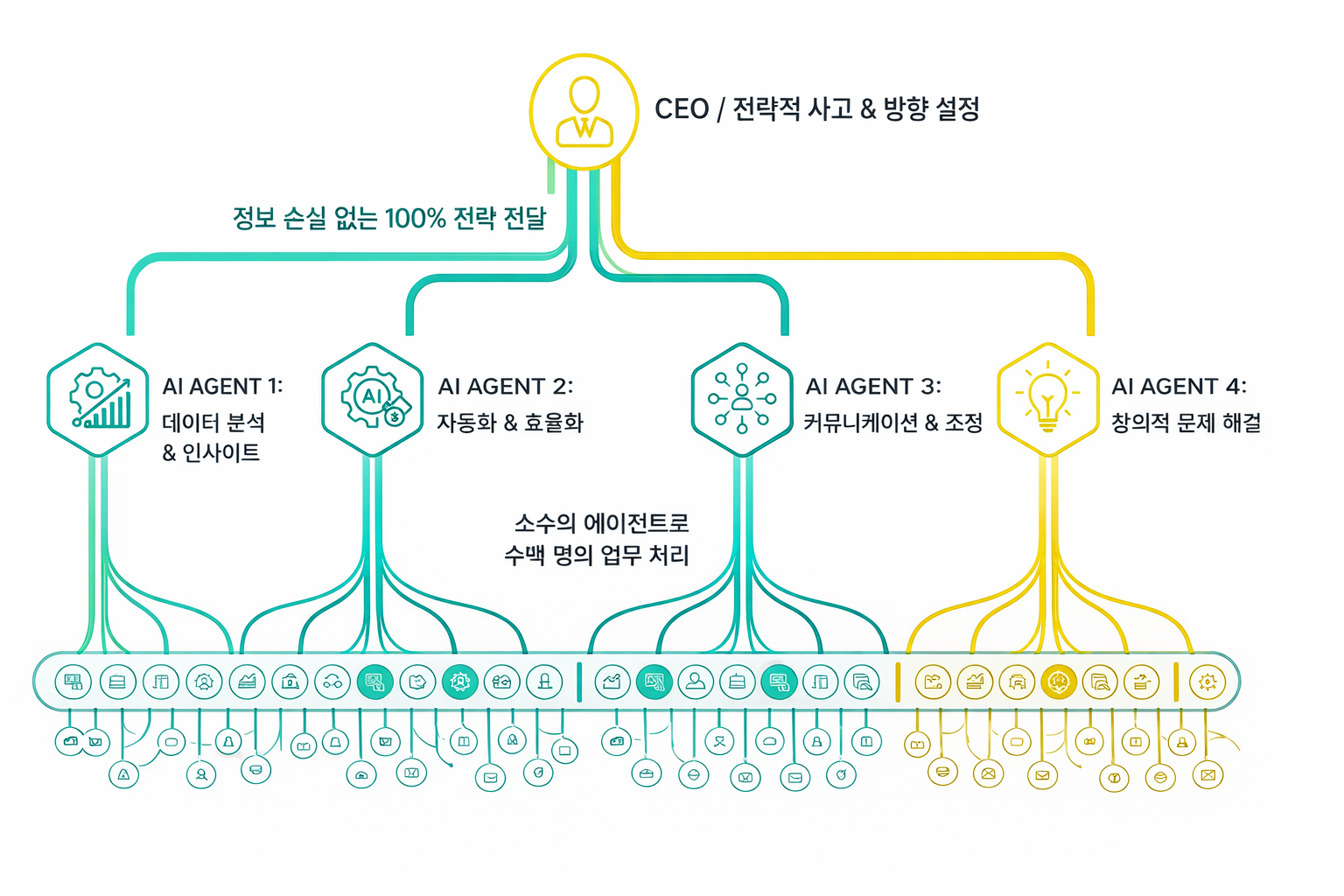
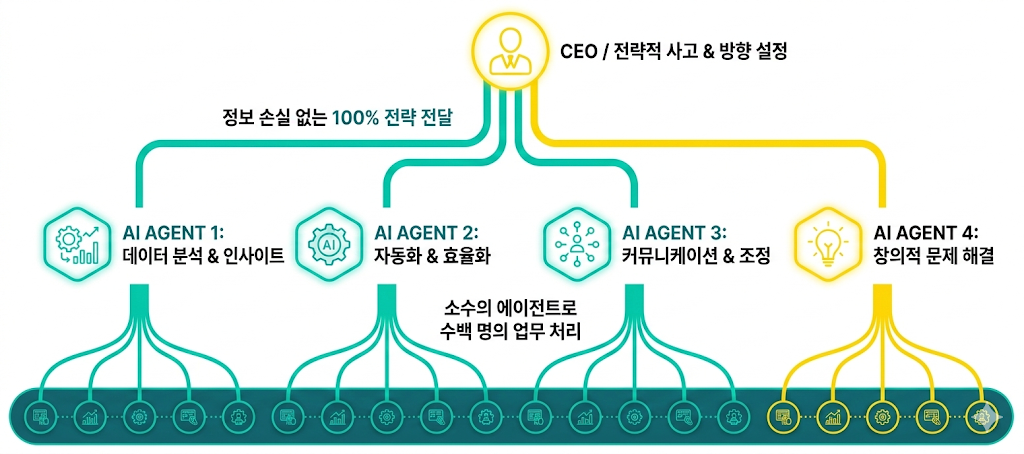
1-1. 3단계 레이어 정보 설계 (Information Architecture)
classDiagram
    class OrgHierarchy {
        +Level1_Top: Single Centered CEO Node in Highlight Yellow
        +Connectors_1: 4 Flowing Pipeline Lines (3 Teal, 1 Yellow)
        +Level2_Mid: Four Hexagonal AI Agent Panels with Equal Spacing
        +Connectors_2: Fan-out Tree Roots connecting to task nodes
        +Level3_Bottom: Stretched Teal Band with 20-30 Micro Task Icons
}- Level 1: 리더십 레이어 (최상단):
- 화면 상단 정중앙. 옐로우 테두리의 원형 노드 1개.
- 정장 차림의 현대적 CEO 픽토그램과
CEO / 전략적 사고 & 방향 설정라벨.
- Level 2: 4대 AI 에이전트 레이어 (중단):
- 화면 중앙에 균일한 간격으로 배치된 4개의 육각형(Hexagonal) 패널:
- Agent 1 (Teal): 데이터 분석 & 인사이트 (차트 + 상승 그래프)
- Agent 2 (Teal): 자동화 & 효율화 (AI 전구 + 문서 + 기어)
- Agent 3 (Teal): 커뮤니케이션 & 조정 (네트워크 노드 + 팀 클러스터)
- Agent 4 (Yellow): 창의적 문제 해결 (빛나는 전구 아이콘)
- 화면 중앙에 균일한 간격으로 배치된 4개의 육각형(Hexagonal) 패널:
- Level 3: 실무 실행 레이어 (최하단):
- 화면 하단을 가로지르는 길고 둥근 모서리의 청록색 밴드.
- 내부에 20~30개의 작은 원형 픽토그램(톱니바퀴, 데이터베이스, 보안키, 체크리스트)이 정밀하게 정렬되어 ’소수의 에이전트로 대규모 업무를 처리’함을 상징.
2. 핵심 디자인 시스템 및 컬러 팔레트
| 분류 | 색상 코드 | 적용 대상 및 시각 규약 |
|---|---|---|
| Background | #FFFFFF |
완전 무결한 순백색 캔버스 (잡음 배제) |
| Primary Teal | #00C7B1 |
메인 테마 컬러. Agent 1~3 패널, 회로 라인, 하단 실행 밴드 |
| Highlight Yellow | #FFD700 |
핵심 강조 컬러. CEO 노드, Agent 4(창의성) 패널 및 전용 라인 |
| Text & UI | #111111 |
명확한 가독성을 위한 다크 차콜 / 딥 블랙 산세리프 |
3. 마스터 프롬프트 패키지 (Positive & Negative)
3-1. 메인 포지티브 프롬프트 (Positive Prompt)
A clean, modern, professional vector infographic on a pure white background (#FFFFFF). Top-down hierarchical org chart that resembles digital circuits and data-flow pipelines. Crisp lines, sharp line icons, sharp sans-serif typography, futuristic but highly trustworthy corporate tone.

COLOR PALETTE: Primary Teal (#00C7B1) and Primary Yellow (#FFD700) on a solid white background. Text in black (#111111) for maximum readability. Subtle minimal glow on icons/panels, no excessive neon lighting.

LAYOUT (16:9 ratio, perfectly aligned, symmetrical, generous white space):

LEVEL 1 (Top Leader): One circular node centered at the top. Inside: modern CEO pictogram (person in suit), highlighted in yellow. Adjacent text: "CEO / Strategic Direction".

STRATEGY TRANSFER LAYER: From the CEO node, 4 clear, flowing digital connector lines go downward. 3 connectors in Teal leading to Agent 1/2/3, and 1 connector in Yellow leading to Agent 4. Above the lines, an elegant arch label: "Lossless Strategy Delivery".

LEVEL 2 (Four AI Agents): Four hexagonal panels aligned horizontally with exact equal spacing.
- Panel 1 (Teal): Data chart + upward graph + gear icon. Text: "AGENT 1: Analytics & Insights".
- Panel 2 (Teal): AI lightbulb + document + gear icon. Text: "AGENT 2: Process Automation".
- Panel 3 (Teal): Network nodes + people cluster icon. Text: "AGENT 3: Communication & Orchestration".
- Panel 4 (Yellow): Glowing lightbulb line icon. Text: "AGENT 4: Creative Problem Solving".

EXPANSION LAYER: From the bottom of each agent panel, many thin curved lines fan out like digital roots, connecting to bottom tasks. Central caption: "High-throughput Autonomous Execution".

LEVEL 3 (Bottom Execution Layer): A long, horizontally stretched rounded teal band at the bottom. Inside the band: exactly 20 to 30 small circular task icons evenly spaced. Tiny line pictograms including: gears, charts, documents, security keys, and databases.

STYLE CONSTRAINTS: Flat vector infographic, pixel-perfect alignment, consistent stroke weights, rounded line caps. --ar 16:9 --style raw --v 6.1
3-2. 네거티브 프롬프트 (Negative Prompt)
photorealistic, background photo, dark background, gradient background, glassmorphism, 3D render, realistic shading, heavy shadow, blur, bokeh, noise, messy layout, crooked alignment, uneven spacing, garbled text, unreadable letters, watermark, signature, logo, duplicated nodes, extra panels, low resolution, clipping --no dark background, 3D render, realistic photos4. 실무 안정화 및 프레젠테이션 구축 팁
- AI 텍스트 왜곡 방지 및 후가공:
- Midjourney나 FLUX로 완벽한 좌우 대칭 회로 구조를 생성한 뒤, 프롬프트 상의 세부 문구는 비워둔 채 Figma나 Illustrator로 가져와 직접 고딕 폰트로 입력하는 것이 엔터프라이즈 보고서의 퀄리티를 보장하는 최선의 방법입니다.
- 과밀 방지 숫자 지정 기법:
- 하단 태스크 노드가 무한정 증식하여 지저분해지는 현상을 막기 위해, 프롬프트에
exactly 20 to 30 small circular task icons와 같이 명확한 수량 상한선을 지정하는 것이 핵심 팁입니다.
- 하단 태스크 노드가 무한정 증식하여 지저분해지는 현상을 막기 위해, 프롬프트에